Free Fire Nickname: What It Is and Why It Matters
Your Free Fire nickname is the name that appears on your profile, in the lobby, on the kill feed and in your squad list. People also call it a Free Fire name, and in searches it is often shortened to FF name or FF nickname. All of these mean the same thing: the name other players use to recognise you.
A plain name is easy to forget, and the best simple names were taken long ago. A small amount of style makes yours easier to notice and remember. On this page you can type any name and see it turned into thousands of styles at once, then copy the one that fits your personality.
How to Create a Free Fire Name in 4 Steps
The tool is free and works in your browser. There is nothing to download and no login. Here is how it works, with real screenshots of this page.
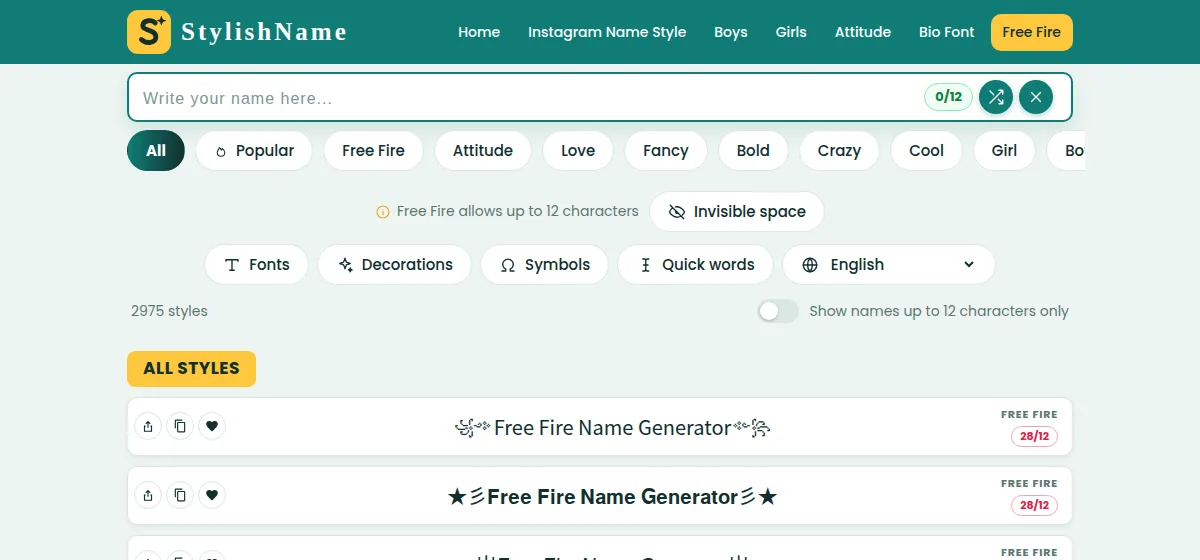
Step 1: Start at the Generator
At the top of the page you will find a name box, a row of categories (All, Popular, Free Fire, Attitude, Love, Fancy, Bold, Crazy, Cool, Girl, Boy, Gaming, Stylish and Clan / Guild), and buttons for Fonts, Decorations, Symbols and Quick words. The list below it is already full of styles, so you can start browsing straight away.
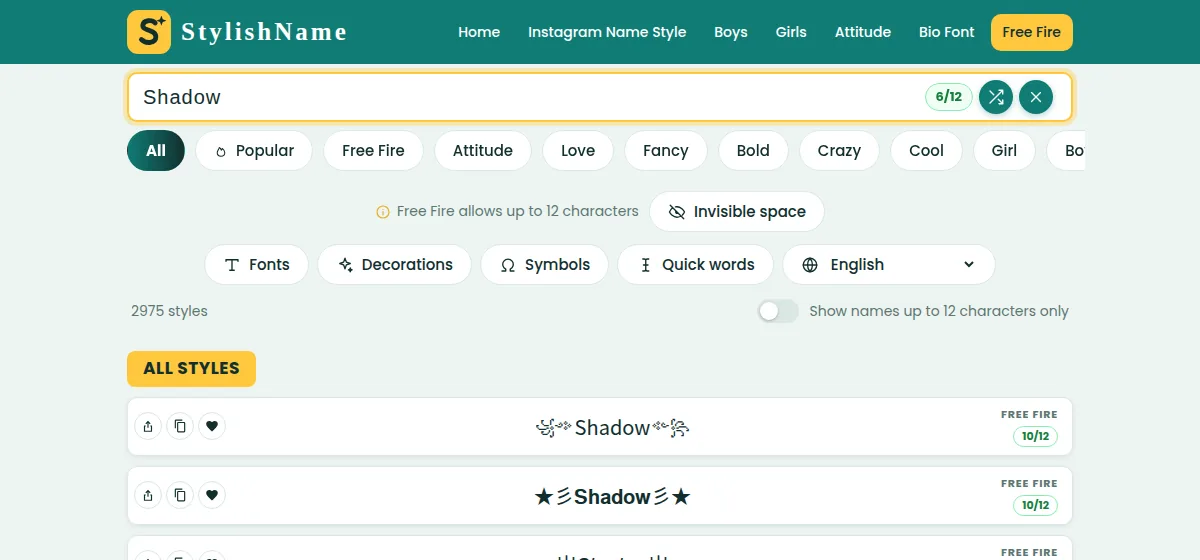
Step 2: Enter Your Name
Click the box and enter your name or nickname. The counter next to it, for example 6/12, tells you how many characters you are using, because Free Fire nicknames are limited to 12 characters. As soon as you type, every style in the list is rebuilt around your name. Use the shuffle button for a random suggestion and the × button to start again.
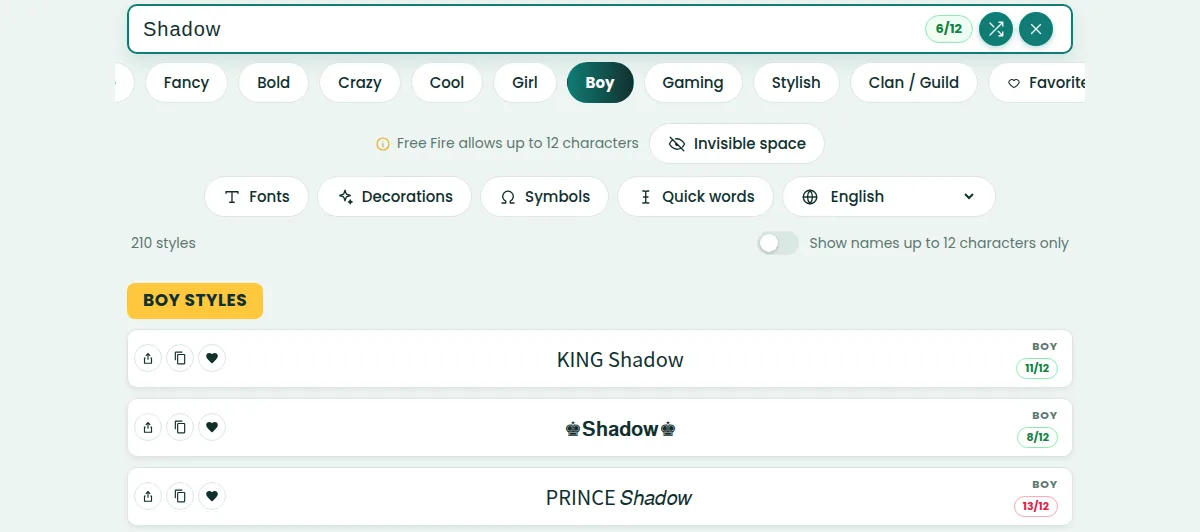
Step 3: Pick a Category and a Style
Open the category that matches the mood you want. For example, the Boy category shows strong looks with crowns and words such as KING and PRINCE. Every row has its own character badge: green means the name fits Free Fire's limit, and red means it is too long. If you only want names that fit, turn on "Show names up to 12 characters only".
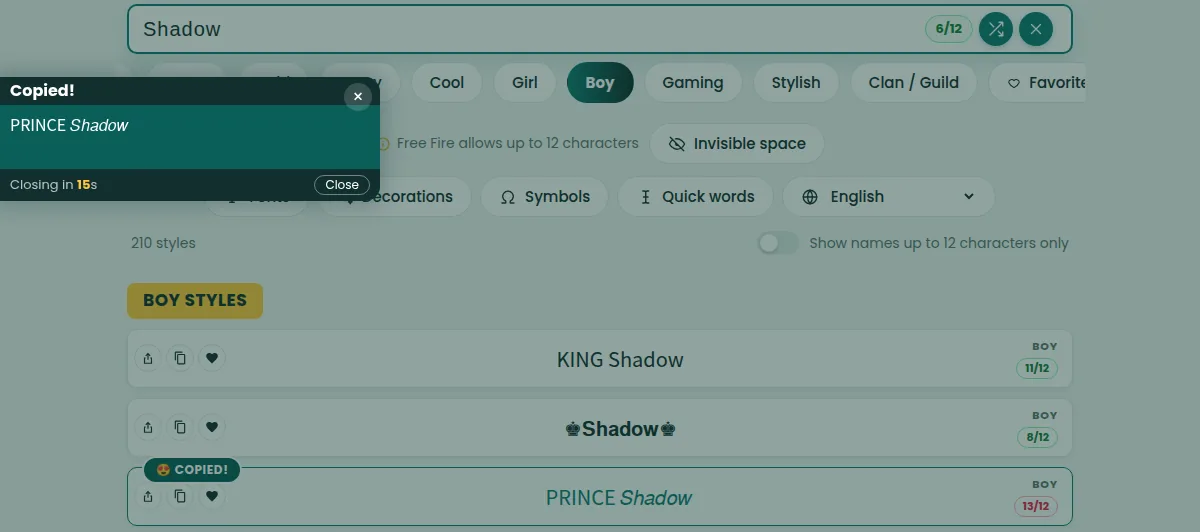
Step 4: Copy, Then Paste in the Game
Tap a style to copy it. A "Copied!" box confirms the exact text. Open Free Fire, go to your profile, edit your nickname and paste the style. Look at the preview carefully before you confirm the change.
Free Fire Name Style Options
Behind every Free Fire name style there are four building blocks. You can explore each one with its own button:
- Fonts change the shape of the letters, for example bold, italic, rounded or small capitals.
- Decorations wrap your name in frames such as stars, wings, crowns or lines.
- Symbols are single characters you add next to your name.
- Quick words are short words, like KING or BOSS, that give your name an instant theme.
You do not need to use all four. A single clean font with one decoration is often the most readable choice, and it saves characters for the 12-character limit.
Free Fire Name Boy: Ideas and Categories
A Free Fire name boy style usually leans on confidence: heavy letters, crowns, swords and power words. Start with the Boy category, then compare it with Attitude, Cool, Bold and Gaming, because those groups share a similar tone but offer different decorations.
Playing with friends? Open Clan / Guild to create names that share a tag, which helps teammates recognise each other quickly. You can also use the Love category for a softer look or Girl for styles that suit a girl's profile.
FF Name and FF Nickname: Choose a Category
If you are looking for an FF name or an FF nickname and do not know where to begin, use the categories as a shortcut:
- Popular and Free Fire: the most copied styles and designs built for the game.
- Attitude, Cool and Bold: serious, confident and strong looks.
- Love, Fancy and Stylish: softer, cleaner and more elegant looks.
- Crazy: wild mixes when you want something different.
- Gaming and Clan / Guild: gamer-style names and team tags.
Free Fire Nickname Length and Symbol Rules
The in-game limit is 12 characters, and decorations count just like letters. That means a short base name leaves more room for style. The badge on each row does the counting for you, so you can avoid names that are too long.
Free Fire may not accept every symbol on every device or game version. If the game rejects a name, or a symbol shows as an empty box, choose another style. Plain letter styles are the safest option.
The Invisible space button adds a blank character to your name. Whether the game accepts it can change after updates, so test it before depending on it.
Save, Share and Reuse Your Names
- Name card: the first button on a row opens a card with your name that you can download or share.
- Copy: the second button copies the style without opening anything.
- Heart: saves the style in Favorites so it is easy to find later.
The page also remembers your recent copies, and the language menu lets you use the tool in your own language.
Mistakes to Avoid When Choosing a Free Fire Name
- Using too many symbols. A name that is mostly decoration is hard to read and may not fit the limit.
- Copying without checking. Always look at the pasted name in the game before you confirm it.
- Choosing a style that is too long. If the badge is red, pick another style or shorten your base name.
- Ignoring your teammates. If your squad cannot read your name, they cannot call you out in a match. Keep it clear.
- Relying on one rare symbol. If it does not display on some phones, the name may look broken to other players.
Why a Good Free Fire Name Is Worth a Few Seconds
Your nickname is the first thing teammates and rivals see, and it stays with you in every match. A thoughtful name makes you easier to remember, easier to find when friends want to invite you, and gives your profile a more finished look. Since changing it takes only a few moments, you can experiment until you find something that really feels like you.
Quick Tips for a Better Free Fire Nickname
- Keep the base name short. Four to seven letters leave space for decoration.
- Choose one theme. A crown with KING feels consistent, but five different symbols look messy.
- Make it readable. Your squad should read it instantly, even in a fast match.
- Watch the counter. Green badges fit the limit.
- Save two or three favorites. Compare them side by side before you decide.
More Name Style Tools
StylishName has generators for other profiles too. If you also want a fancy name for Instagram, try the Instagram name style generator, the boys styles, the girls styles, the attitude styles or the bio font styles.
Frequently Asked Questions
What is the maximum length of a Free Fire nickname?
Free Fire allows 12 characters. This page shows a counter and a green or red badge on every style.
How do I use a style from this page in Free Fire?
Tap the style to copy it, open Free Fire, edit your nickname in your profile and paste it. Depending on your account, the game may ask for a name change card.
Are a Free Fire name and a Free Fire nickname different?
No. They are two words for the same thing, and "FF name" and "FF nickname" are shorter versions.
Is the generator free?
Yes. You can create and copy as many styles as you like without registering.
Do the styles work on Android and iPhone?
Most do. A few rare symbols can look different on some devices, so check the name after pasting.
Where can I find Free Fire name boy styles?
Open the Boy category above the list. Attitude, Cool and Gaming are also good for boys who want a tougher look.
Is this site official?
No. This is an independent tool and is not affiliated with or endorsed by Garena or Free Fire. Free Fire is a trademark of its owner.
Make Your Free Fire Nickname Now
Enter your name at the top, try a few categories, and copy the style that feels right. You can come back any time to try a new look.